My account

Boston Scientific accounts are for healthcare professionals only.

Create an account to access online training and education on EDUCARE, manage your customer profile, and connect with customer support and service teams.

My Boston Scientific account

Access your online applications and manage your customer profile.

Quick Links

Call customer care

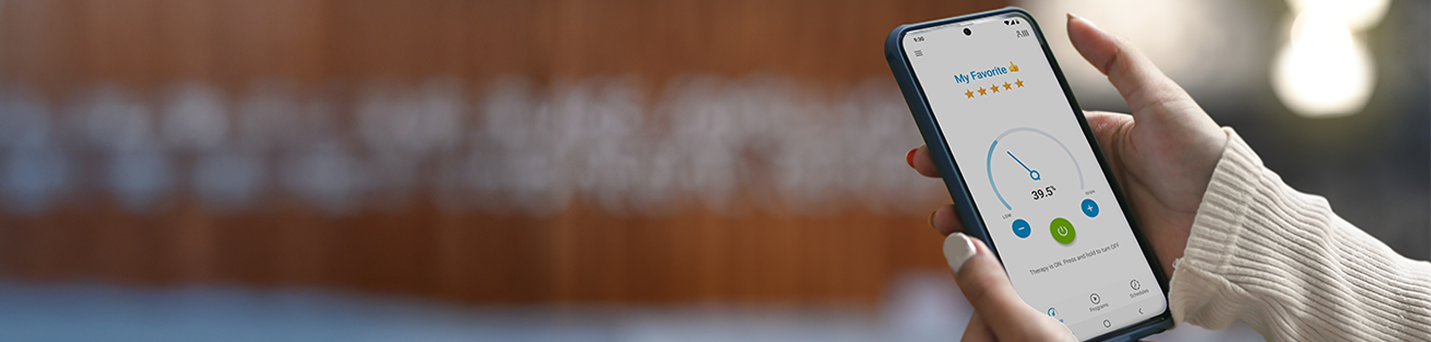
Person using mySCS GO therapy controller.

Using your mySCS™ GO Therapy Controller

The mySCS GO Therapy Controller App is a component of your Boston Scientific Spinal Cord Stimulator (SCS) System. Use the Therapy Controller App to turn therapy ON or OFF, adjust stimulation strength, and activate or modify Programs and Schedules that have been created for you.

Therapy Controller video guide

FAQs

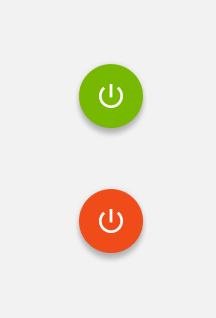
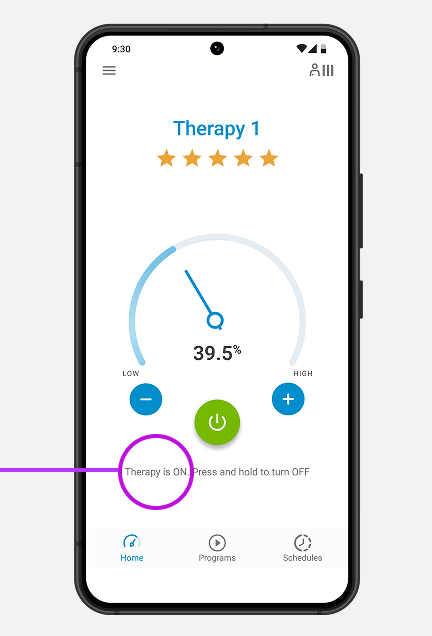
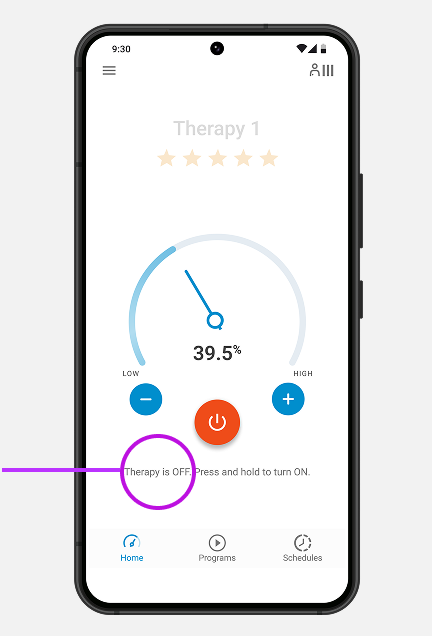
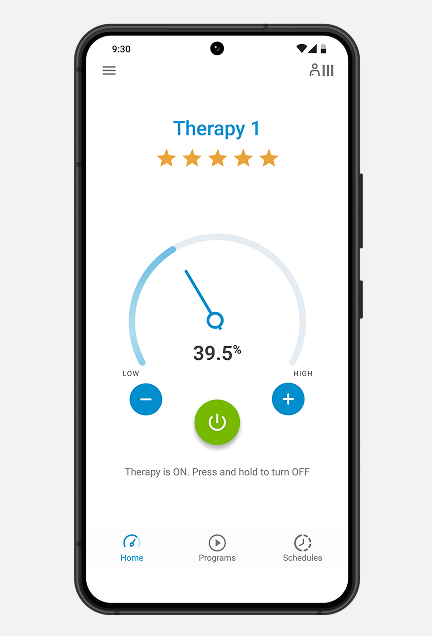
You can turn therapy on and off by pressing the ON (green)/OFF (red) button on the home screen. 

my controller on and off buttons.
myscsgo on button.
myscsgo off button.

You can adjust the stimulation strength when a program or schedule is running. To decrease stimulation, press the "-” button. To increase stimulation, press the “+” button.

myscsgo stimulation control buttons - to decrease, + to increase.
myscsgo home screen.

If your stimulator has been configured with programs that can be changed, you can use your Therapy Controller to switch between programs. Refer to your mySCS GO Therapy Controller Patient Handbook for detailed instructions on selecting programs. 

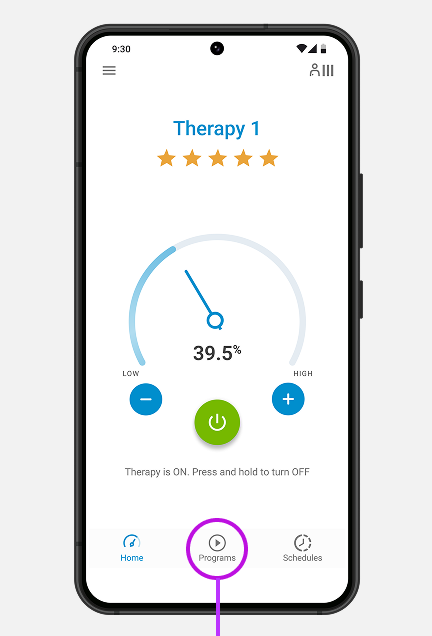
tap program icon at bottom center of screen to select a program.

Tap Programs button

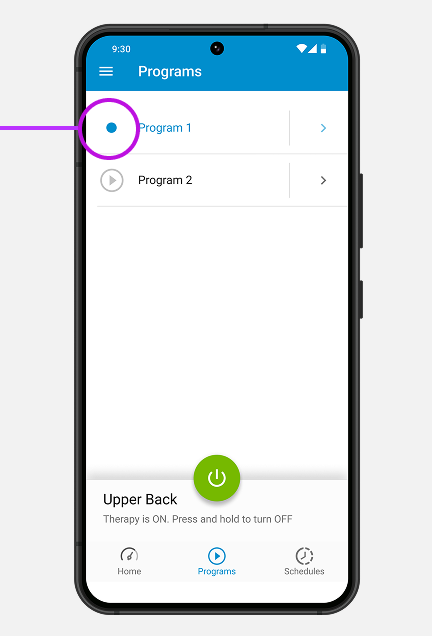
tap program name to select program. It will highlight in blue when selected.

Tap Program Name to select desired program. When selected, the circle will be highlighted in blue

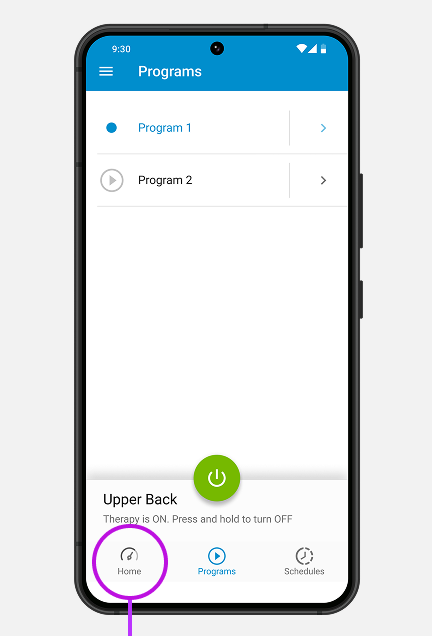
tap home button icon on bottom left of screen to return to main screen.

Tap Home button to return to main screen

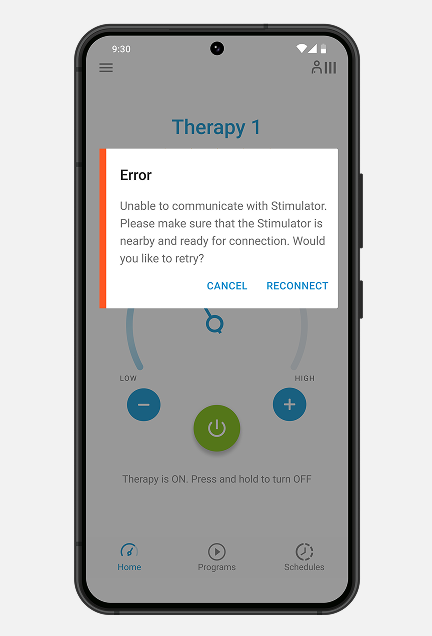
The mySCS GO Therapy Controller has a typical range of up to 3 meters (about 9 feet). 

Note: If you are within that range, and still receive the Communication Error screen, try holding your Therapy Controller very close to your body near your stimulator and try again. Remember, you will also see this error if you attempt to use the Therapy Controller while you are charging your stimulator.

myscsgo screen showing out of range error message.

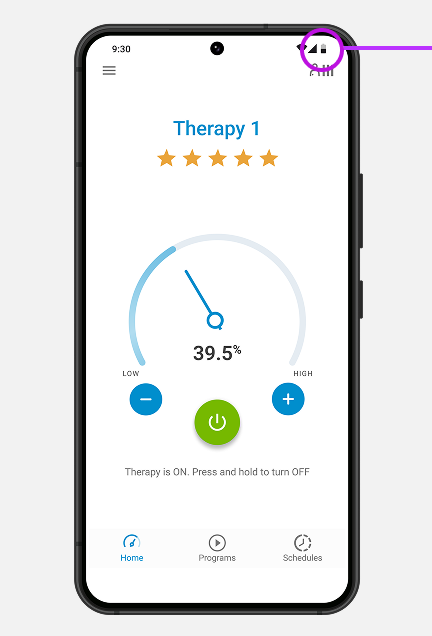
You will monitor the battery level on your mySCS GO Therapy Controller as you would with any mobile phone. We recommend you charge your Therapy Controller every night, keeping it on your bedside table.

myscsgo battery level icon in upper right corner.

Therapy Controller battery level

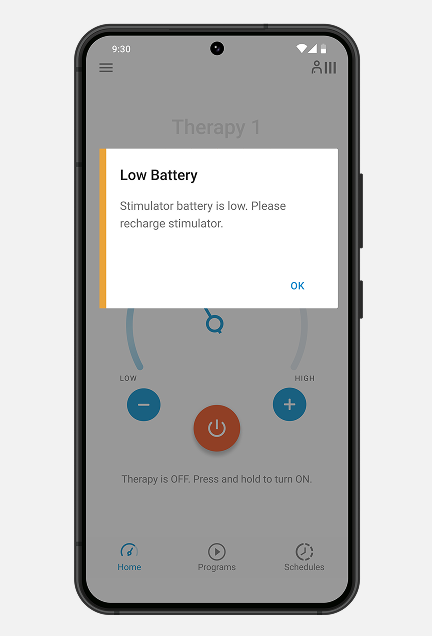
This message means it’s time to charge your stimulator. You can learn how to do that here.

Note: The Therapy Controller will not communicate with your stimulator while it is charging.

myscsgo controller low battery message.

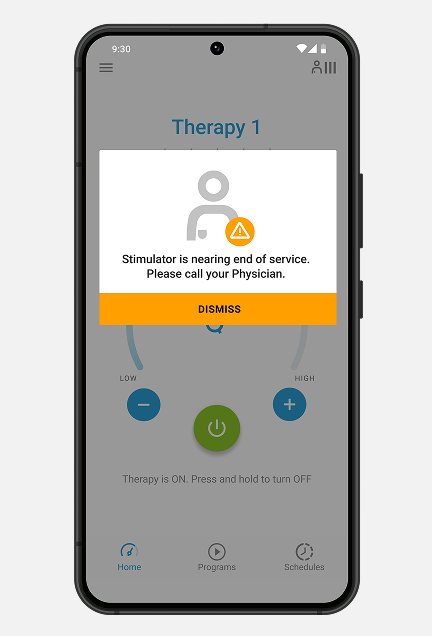
When the battery of a non-rechargeable stimulator is nearing depletion, it will enter Elective Replacement Indicator (ERI) mode and will display the following message: 

myscsgo stimulator near end of service message.

You will no longer be able to save changes made to your therapy on the Therapy Controller, and your stimulator must be replaced to continue receiving therapy. Call your doctor's office or local Boston Scientific representative to report this message screen and discuss your stimulator replacement options.

Before you start, make sure you know your Wi-Fi network name and password. You will often find them on the back of your Wi-Fi router.

The Wi-Fi network names in the images below are for illustrative purposes only – the Wi-Fi networks listed on your device will be different.

To begin, unlock your mySCS GO Therapy Controller.

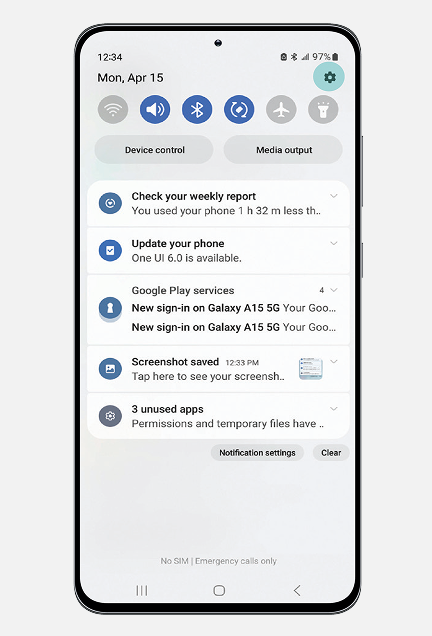
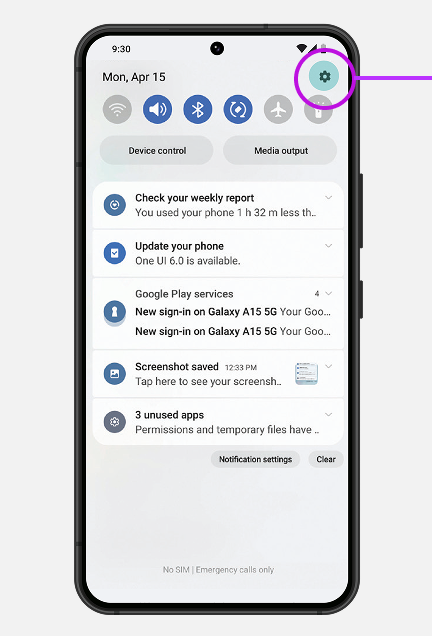
To find wifi, swipe down from the top of the screen and tap the settings icon.

Find Wi-Fi
Swipe down from the top of the screen and tap the settings icon

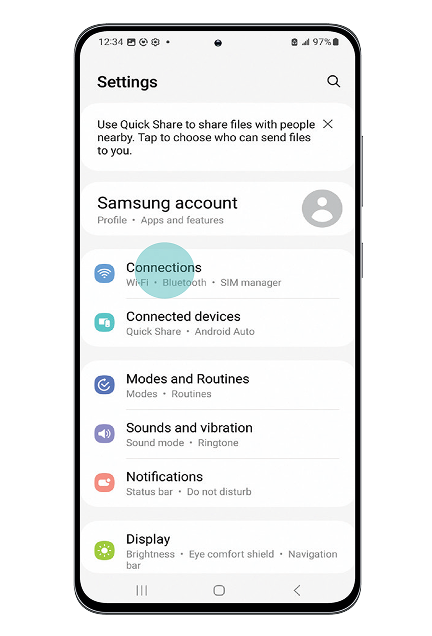
Settings screen showing where to tap Connections.

Tap Connections

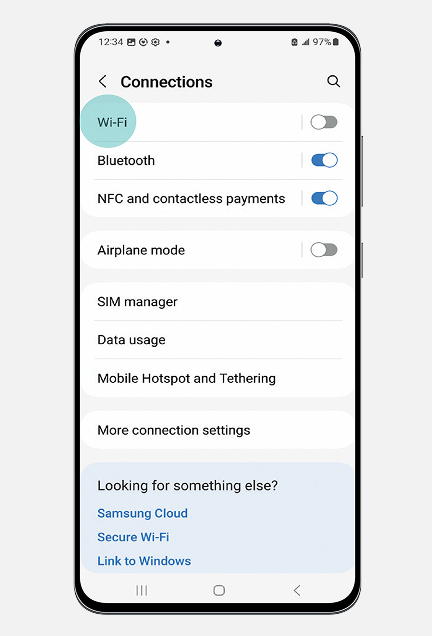
Connections screen showing where to toggle wifi on.

Tap Wi-Fi

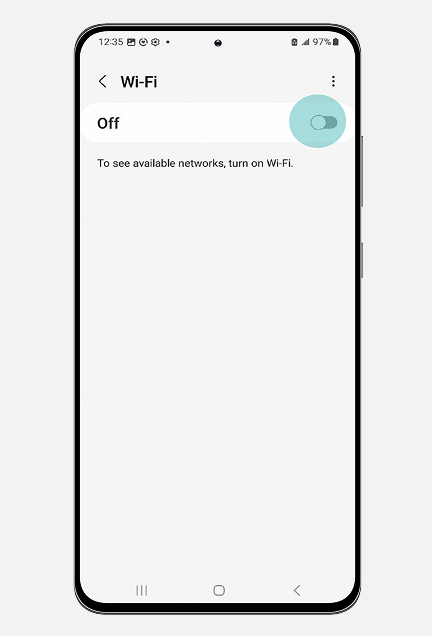
wifi toggle switch in the upper right of your screen will turn it on and off.

Tap the indicator to turn Wi-Fi on

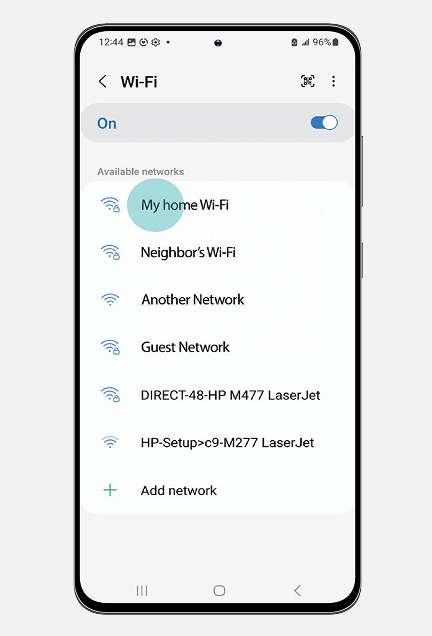
Selecting your home wifi.

Select your Wi-Fi network

Tap on the name of your Wi-Fi network from the list

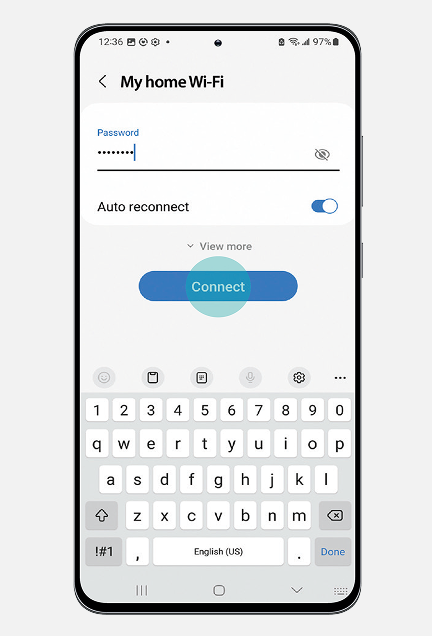
Screen where you enter your personal wifi password, then tap to connect.

Connect to Wi-Fi
Type the correct password and tap Connect

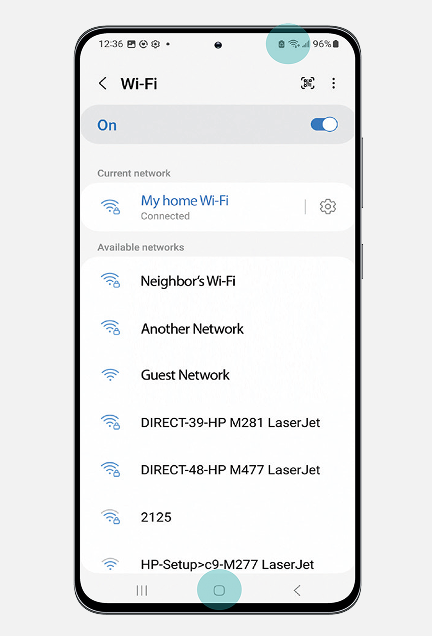
wifi icon at top of screen shows when you're connected.

Once connected, you’ll see the Wi-Fi icon at the top of the screen

Connecting to your home Wi-Fi allows your mySCS GO Therapy Controller to send data about your device performance and therapy choices to Boston Scientific. This information may help your Care Team address any questions you have about your device without requiring you to visit your doctor's office. The data you share is encrypted and securely stored. It is only shared with your healthcare provider.

You can opt out of sharing data at any time. Your Boston Scientific representative can show you how to opt out or you can consult the patient instruction handbook you received with your Therapy Controller.

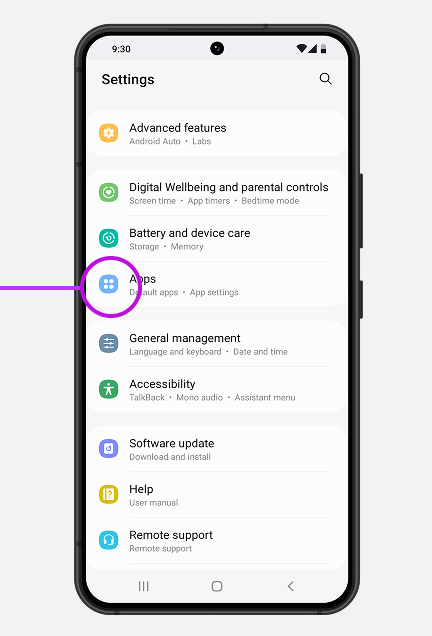
You can try to force stop the App by following these steps. Once you have stopped the App, you can relaunch it.

settings icon in upper right of screen.

Swipe down from the top of the screen and tap the settings icon

tap Apps.

Tap Apps

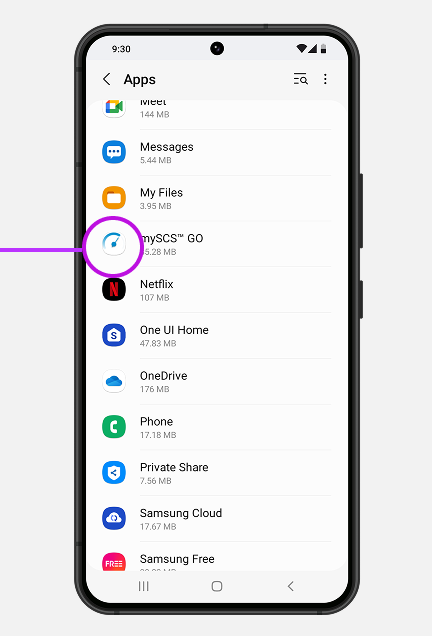
In Apps, tap mySCS GO.

Tap mySCS GO

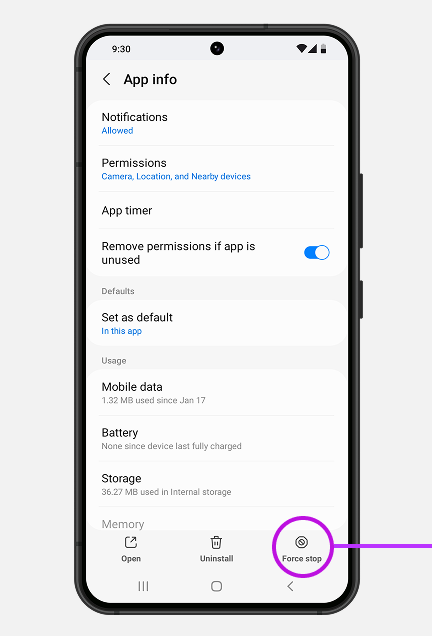
force stop icon found in lower right of screen.

Tap the button to Force stop

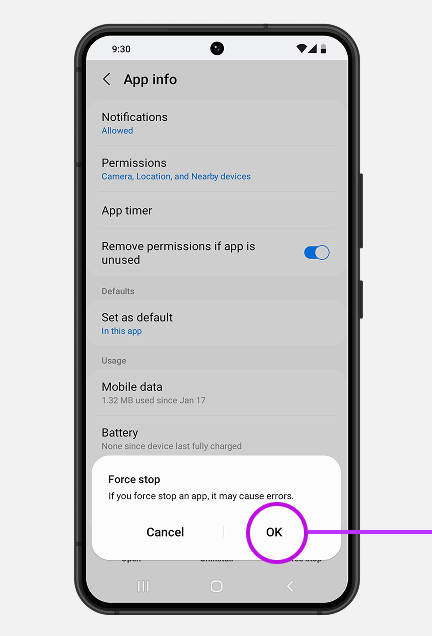
confirm force stop by tapping ok.

Tap OK to confirm Force stop

No, we do not suggest adding a pass code. If you accidentally forget it, we are unable to reset it.

You can call our Patient Care team at (866) 360-4747 to discuss your replacement options.

Yes, your Therapy Controller and charging system have a 12-month warranty. 

Helpful tips

Do not delete the mySCS GO App

Do not unpair your Therapy Controller from your Bluetooth® settings

Make sure to check the compatibility website before installing any updates

To learn about other features and options, consult the mySCS GO Therapy Controller patient handbook

icon-document-with-magnifying-glass.

mySCS GO Therapy Controller patient handbook

Learn about all the features, modes, and settings of your Therapy Controller.

We’re here to help

Our Patient Care team is here to support you throughout your SCS journey.

Available 5am to 5pm PST, Monday through Friday

The Bluetooth® word mark and logos are registered trademarks owned by the Bluetooth SIG, Inc. and any use of such marks by Boston Scientific Neuromodulation Corporation is under license.

For a list of compatible mobile devices, visit www.myscsjourney.com/mySCSGO. The mySCS™ GO Therapy Controller Application is compatible with the WaveWriter Alpha Spinal Cord Stimulation System only.

Indications for Use: The Boston Scientific Spinal Cord Stimulator (SCS) Systems* are indicated as an aid in the management of chronic intractable pain of the trunk and/or limbs including unilateral or bilateral pain associated with the following: Failed Back Surgery Syndrome, Complex Regional Pain Syndrome (CRPS) Types I and II, Intractable low back pain and leg pain, Diabetic Peripheral Neuropathy of the lower extremities, Radicular pain syndrome, Radiculopathies resulting in pain secondary to failed back syndrome or herniated disc, Epidural fibrosis, Degenerative disc disease (herniated disc pain refractory to conservative and surgical interventions), Arachnoiditis, Multiple back surgeries.

The Boston Scientific Spectra WaveWriter™, WaveWriter Alpha™ and WaveWriter Alpha™ Prime SCS Systems are also indicated as an aid in the management of chronic intractable unilateral or bilateral low back and leg pain without prior back surgery.

*The Boston Scientific Spinal Cord Stimulator (SCS) Systems include the following: Precision™ System, Precision Spectra™ System, Precision Novi™ System, Precision Montage™ MRI System, Spectra WaveWriter™ System, WaveWriter Alpha™ System, WaveWriter Alpha™ Prime System.

Note: CRPS I was previously referred to as Reflex Sympathetic Dystrophy (RSD) and CRPS II was previously referred to as causalgia.

The mySCS™ Go Therapy Controller is intended to communicate with and control the compatible Boston Scientific Stimulator.

Contraindications: The Boston Scientific Spinal Cord Stimulator systems are not for patients who are unable to operate the system, have failed trial stimulation by failing to receive effective pain relief, are poor surgical candidates, or are pregnant.

Warnings: With all medical procedures, there are risks associated with the procedure and the use of the device. Patients implanted with Boston Scientific Spinal Cord Stimulator systems without ImageReady™ MRI Technology should not be exposed to Magnetic Resonance Imaging (MRI). Exposure to MRI may result in dislodgement of the stimulator or leads, heating of the stimulator, severe damage to the stimulator electronics and an uncomfortable or jolting sensation. As a Spinal Cord Stimulation patient, you should not have diathermy as either a treatment for a medical condition or as part of a surgical procedure. Strong electromagnetic fields, such as power generators or theft detection systems, can potentially turn the stimulator off, or cause uncomfortable jolting stimulation. The system should not be charged while sleeping. The Boston Scientific Spinal Cord Stimulator system may interfere with the operation of implanted sensing stimulators such as pacemakers or implanted cardiac defibrillators. Advise your physician that you have a Spinal Cord Stimulator before going through with other implantable device therapies so that medical decisions can be made and appropriate safety measures taken. Patients using therapy that generates paresthesia should not operate motorized vehicles such as automobiles or potentially dangerous machinery and equipment with the stimulation on. Stimulation must be turned off first in such cases. For therapy that does not generate paresthesia (i.e. subperception therapy) it is less likely that sudden stimulation changes resulting in distraction could occur while having stimulation on when operating moving vehicles, machinery, and equipment.

Be sure to talk with your doctor so that you thoroughly understand all of the risks, precautions, and benefits associated with the use of the device and what indicates, and contraindicates, certain patients– as well as the risks and precautions for the procedure. For complete indications for use, contraindications, warnings, precautions, and side effects, call 866.360.4747 or visit Pain.com.

Caution: U.S. Federal law restricts this device to sale by or on the order of a physician.