Boston Scientific accounts are for healthcare professionals only.

As a patient with a Spinal Cord Stimulator (SCS) system, it’s important to be aware that certain medical tests, therapies, and procedures can affect or permanently damage your SCS system. Be sure to tell your doctor about your SCS system before undergoing any test or procedure.
SCS system MRI* compatibility
MRI safety is an important consideration when you have an SCS system. Your MRI compatibility depends on which Boston Scientific SCS system you are implanted with. Your doctor must decide whether an MRI procedure is appropriate for you.
If you can’t remember what SCS system you are implanted with, you can:
Check your Medical ID card. The SCS system type is listed at the top.
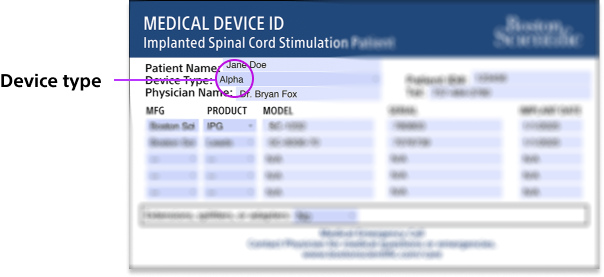
Call Patient Care at (866) 360-4747
| SCS System | MRI Conditionality |
| Precision™ Plus | Not MRI Compatible |
| Precision Novi™ | Not MRI Compatible |
| Precision Montage™ MRI | Full-body |
| Spectra WaveWriter™ | Head-only |
| WaveWriter Alpha™ | Full-body |
MRI eligibility checklists and Directions for Use, including full MRI safety information, can be obtained at bostonscientific.com/scsmri.
MRI safety conditions
If you are implanted with a WaveWriter Alpha Spinal Cord Stimulator System, certain conditions must be met to safely undergo an MRI, including but not limited to:
Stimulator must be fully charged (for rechargeable implants)
Bring your charging system to the MRI appointment (in case charging is necessary)
Bring your remote control or Therapy Controller to the MRI appointment
Enable MRI Mode on your remote control or Therapy Controller while at the MRI appointment with the MRI tech
Note: The remote control or Therapy Controller, and charging system are not MRI safe and must not be brought into the MRI Scanner Room.
Setting your SCS system to MRI mode
Before your MRI appointment, it is a good idea to practice entering MRI Mode on your Freelink™ Remote Control or mySCS™ GO Therapy Controller.
To enable MRI Mode: Unlock the remote control by pressing the Lock/Unlock button on the right side of the remote control. Press the Right Arrow button on the remote control to navigate to the main menu.
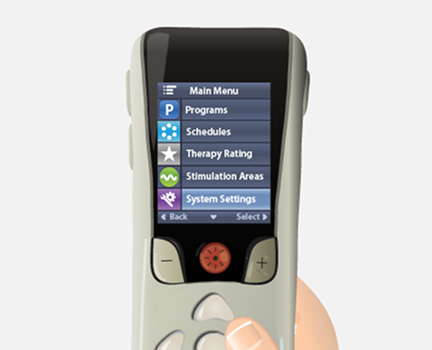
Select System Settings. Select by pressing the white, center round button
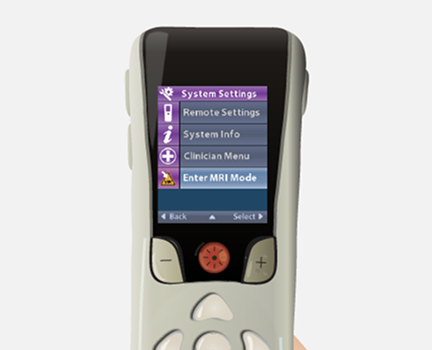
Select Enter MRI Mode
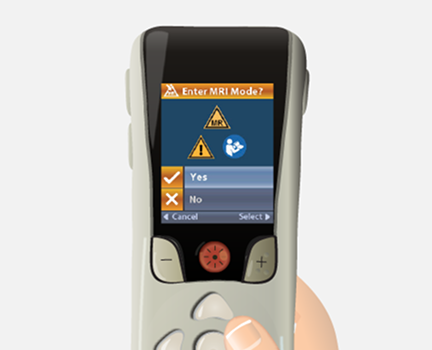
Select Yes to enter MRI Mode
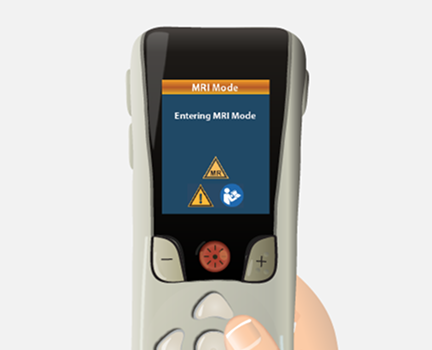
The system performs a series of checks
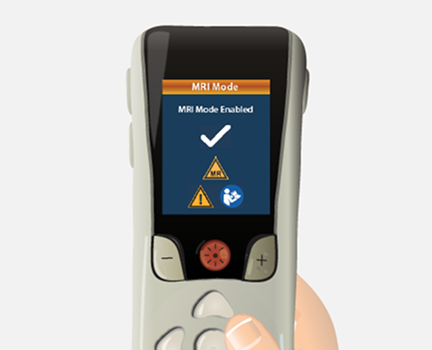
MRI Mode is enabled
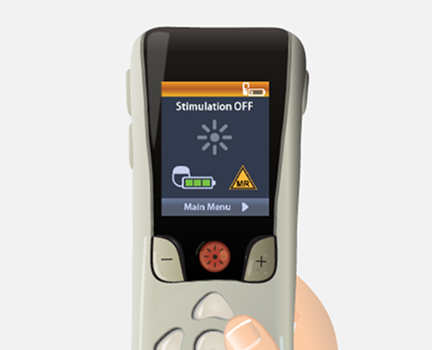
Stimulation is off
If you are unable to enter MRI Mode, do not proceed with the MRI scan. Contact Patient Care at (866) 360-4747 or contact your local Boston Scientific representative.
To disable MRI Mode: Unlock the remote control by pressing the Lock/Unlock button on the right side of the remote control. Press the Right Arrow button on the remote control to navigate to the main menu.
Select System Settings. Select by pressing the white, center round button
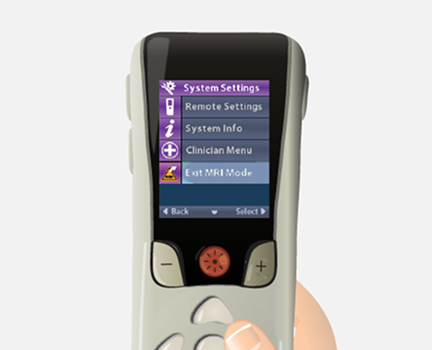
Select Exit MRI Mode
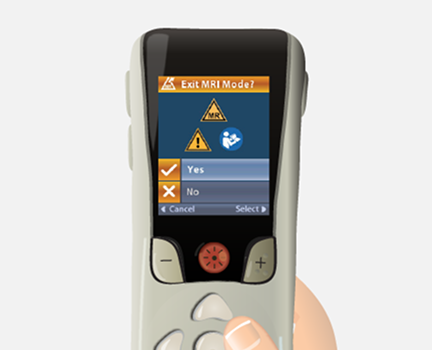
Select Yes to exit MRI Mode
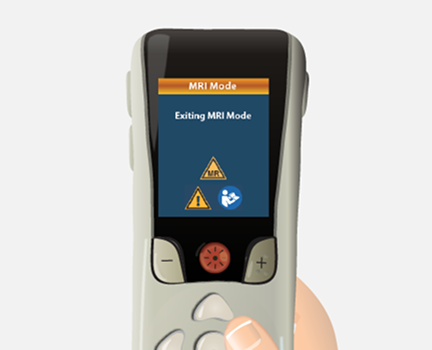
The system performs a series of checks
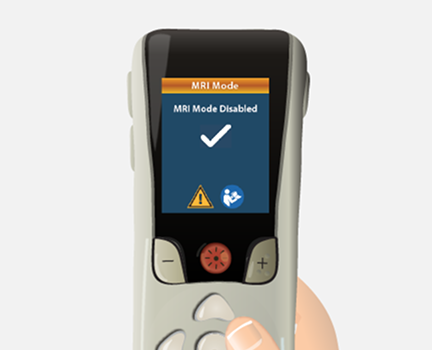
MRI Mode is disabled
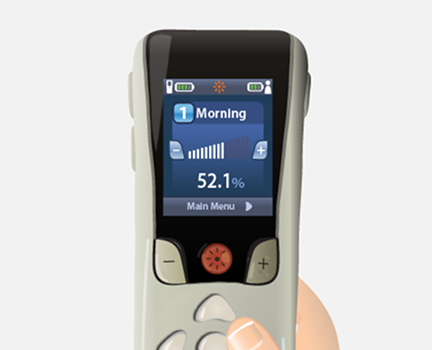
Stimulation is on
To enable MRI Mode, follow these steps:
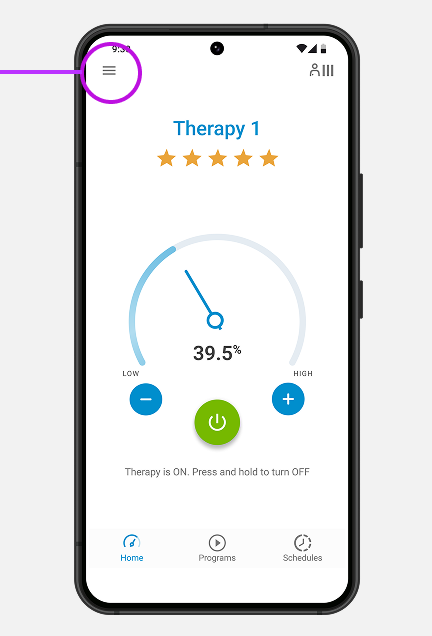
Tap Main Menu button
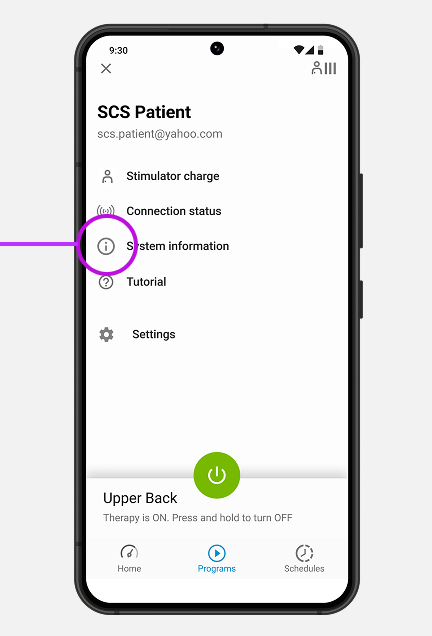
Tap System information
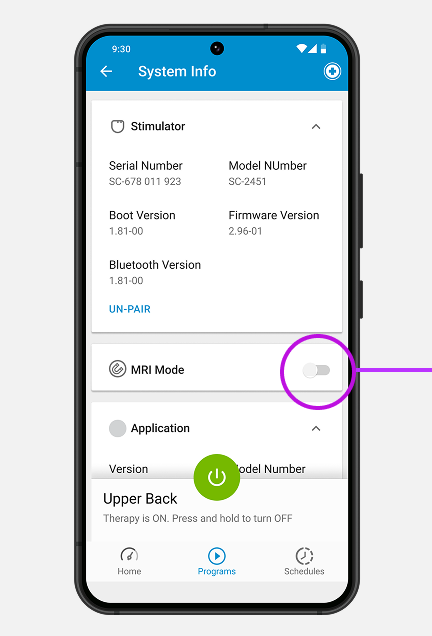
Tap MRI Mode slider to activate
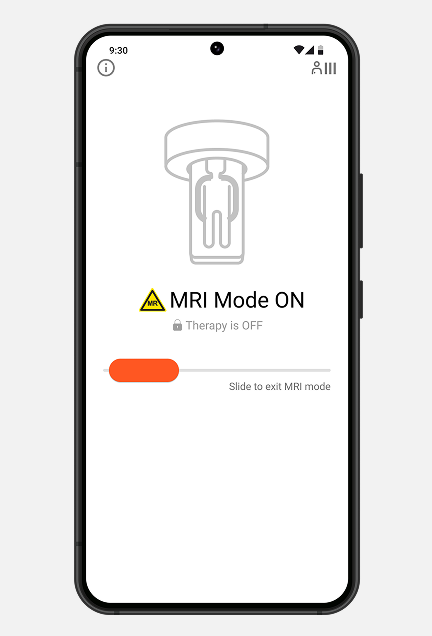
Confirm the screen displays the MRI Mode ON message
NOTE: Therapy automatically turns OFF when MRI Mode is enabled.
If you are unable to enter MRI Mode, do not proceed with the MRI scan. Contact Patient Care at (866) 360-4747 or contact your local Boston Scientific representative.
To disable MRI Mode, follow these steps:
The Stimulator keeps the settings that were active before entering MRI Mode. If therapy was ON before entering MRI Mode, then exiting MRI Mode turns therapy back ON. If therapy was OFF before entering MRI Mode, then exiting MRI Mode keeps therapy OFF.
Slide MRI Mode slider to exit
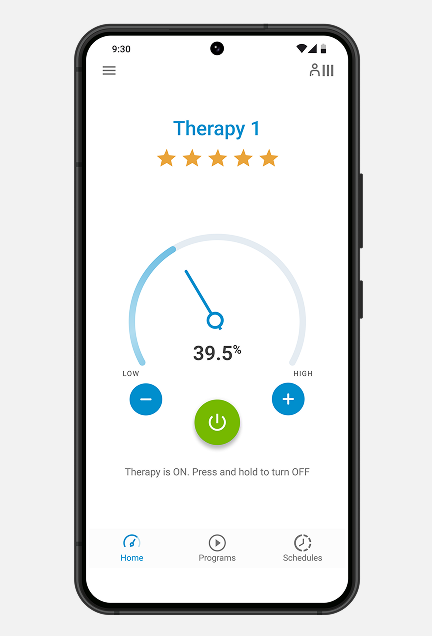
Confirm the screen displays the home screen and therapy settings have returned to previous state
Finding an MRI center near you
Use this locator to find an imaging center near you that is pre-screened to perform MRI scans on Boston Scientific SCS patients.
Undergoing other imaging tests
With your Boston Scientific SCS system, you have access to a range of common imaging methods, including:
X-Rays
CT scans
PET scans
Ultrasounds
Consult with your doctor prior to these procedures.
Other medical procedures and therapies
Before undergoing any medical procedure, be sure to let your doctor know about your spinal cord stimulator (SCS) stimulator. Different treatment protocols may need to be used.
The following medical therapies or procedures may turn therapy off or may cause permanent damage to the stimulator, particularly if used in close proximity:
- Dental Treatments
- Cardiac Pacemakers
- Lithotripsy
- Electrocautery
- External Defibrillation
- Radiation Therapy
- Diathermy

We’re here to help
Our Patient Care team is here to support you throughout your SCS journey.
Available 5am to 5pm PST, Monday through Friday
*MRI Conditional under specified conditions
For a list of compatible mobile devices, visit www.myscsjourney.com/mySCSGO. The mySCS™ GO Therapy Controller Application is compatible with the WaveWriter Alpha Spinal Cord Stimulation System only.
Indications for Use: The Boston Scientific Spinal Cord Stimulator (SCS) Systems* are indicated as an aid in the management of chronic intractable pain of the trunk and/or limbs including unilateral or bilateral pain associated with the following: Failed Back Surgery Syndrome, Complex Regional Pain Syndrome (CRPS) Types I and II, Intractable low back pain and leg pain, Diabetic Peripheral Neuropathy of the lower extremities, Radicular pain syndrome, Radiculopathies resulting in pain secondary to failed back syndrome or herniated disc, Epidural fibrosis, Degenerative disc disease (herniated disc pain refractory to conservative and surgical interventions), Arachnoiditis, Multiple back surgeries.
The Boston Scientific Spectra WaveWriter™, WaveWriter Alpha™ and WaveWriter Alpha™ Prime SCS Systems are also indicated as an aid in the management of chronic intractable unilateral or bilateral low back and leg pain without prior back surgery.
*The Boston Scientific Spinal Cord Stimulator (SCS) Systems include the following: Precision™ System, Precision Spectra™ System, Precision Novi™ System, Precision Montage™ MRI System, Spectra WaveWriter™ System, WaveWriter Alpha™ System, WaveWriter Alpha™ Prime System.
Note: CRPS I was previously referred to as Reflex Sympathetic Dystrophy (RSD) and CRPS II was previously referred to as causalgia.
The mySCS™ Go Therapy Controller is intended to communicate with and control the compatible Boston Scientific Stimulator.
Contraindications: The Boston Scientific Spinal Cord Stimulator systems are not for patients who are unable to operate the system, have failed trial stimulation by failing to receive effective pain relief, are poor surgical candidates, or are pregnant.
Warnings: With all medical procedures, there are risks associated with the procedure and the use of the device. Patients implanted with Boston Scientific Spinal Cord Stimulator systems without ImageReady™ MRI Technology should not be exposed to Magnetic Resonance Imaging (MRI). Exposure to MRI may result in dislodgement of the stimulator or leads, heating of the stimulator, severe damage to the stimulator electronics and an uncomfortable or jolting sensation. As a Spinal Cord Stimulation patient, you should not have diathermy as either a treatment for a medical condition or as part of a surgical procedure. Strong electromagnetic fields, such as power generators or theft detection systems, can potentially turn the stimulator off, or cause uncomfortable jolting stimulation. The system should not be charged while sleeping. The Boston Scientific Spinal Cord Stimulator system may interfere with the operation of implanted sensing stimulators such as pacemakers or implanted cardiac defibrillators. Advise your physician that you have a Spinal Cord Stimulator before going through with other implantable device therapies so that medical decisions can be made and appropriate safety measures taken. Patients using therapy that generates paresthesia should not operate motorized vehicles such as automobiles or potentially dangerous machinery and equipment with the stimulation on. Stimulation must be turned off first in such cases. For therapy that does not generate paresthesia (i.e. subperception therapy) it is less likely that sudden stimulation changes resulting in distraction could occur while having stimulation on when operating moving vehicles, machinery, and equipment.
Be sure to talk with your doctor so that you thoroughly understand all of the risks, precautions, and benefits associated with the use of the device and what indicates, and contraindicates, certain patients– as well as the risks and precautions for the procedure. For complete indications for use, contraindications, warnings, precautions, and side effects, call 866.360.4747 or visit Pain.com.
Caution: U.S. Federal law restricts this device to sale by or on the order of a physician.